Most conversations about self-hosted AI start with cloud GPU pricing and end with a monthly bill that makes your eyes water. I went a different direction: a compact home server running local LLMs and image generation, connected to every machine in my infrastructure through an encrypted mesh network. No cloud dependency, no per-token billing, no data leaving my network.
This is the setup I’ve been running for the past year, and it handles everything from code assistance to image generation to automated content pipelines. Here’s how the pieces fit together.
The Hardware: A Mini PC That Punches Up
The foundation is an Intel NUC-class mini PC. Small enough to sit on a shelf, quiet enough to forget it’s there, but with enough RAM to run serious models. The specific configuration:
- 11th-gen Intel CPU with integrated Iris Xe graphics
- 32 GB DDR4 (critical for LLM context windows)
- NVMe storage for fast model loading
- Alongside it: a dedicated workstation with an NVIDIA RTX 3090 (24 GB VRAM) for GPU-accelerated inference and image generation
- Combined power draw under 120W idle, peaking around 400W during heavy GPU inference
The NUC handles lightweight, always-on tasks: small model inference, routing, and orchestration. But the real muscle is the RTX 3090 workstation sitting next to it. With 24 GB of VRAM, it runs 13B-30B parameter models at full GPU speed and handles Stable Diffusion XL image generation in seconds, not minutes. The two machines complement each other: the NUC is the always-on brain, the GPU box is the heavy lifter.
The Virtualization Layer: Proxmox VE
The NUC doesn’t run anything directly on bare metal. It runs Proxmox VE, an open-source virtualization platform based on KVM and LXC. This might seem like overkill for a small machine, but it’s the same hypervisor I run across all my infrastructure, and consistency matters more than marginal performance gains.
Proxmox gives me:
- LXC containers for lightweight, isolated workloads. Each AI service runs in its own container with dedicated resources.
- Snapshot and backup capabilities. Before upgrading a model or changing a configuration, I snapshot. If something breaks, rollback takes seconds.
- Resource allocation that’s easy to adjust. If the Ollama container needs more RAM for a larger model, I change one number and restart.
- A unified management interface across all my hosts. The same Proxmox web UI manages this NUC, my data center servers, and everything in between.
The NUC currently runs several containers: one dedicated to LLM inference, one for image generation, one for an AI agent platform, and a few utility containers for monitoring and networking. Total resource usage hovers around 24 GB RAM allocated and 60% CPU under typical load.
Ollama: LLMs Without the Complexity
Ollama is the runtime that makes self-hosted LLMs practical. It handles model management, quantization, and serving behind a simple API that’s compatible with the OpenAI chat completions format. One command pulls a model, another serves it.
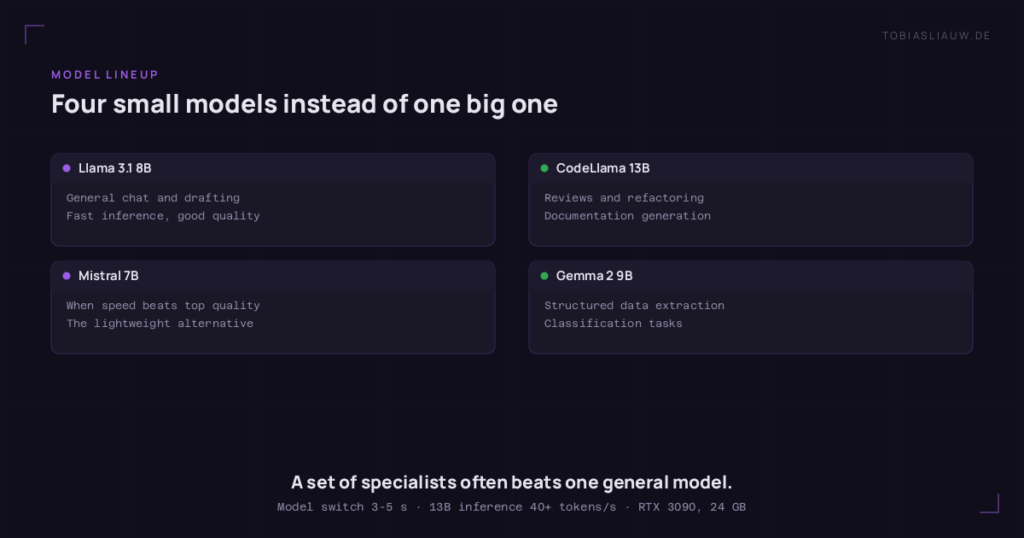
The models I keep loaded and rotate between:
- Llama 3.1 8B for general-purpose chat, drafting, and quick tasks. Fast inference, good quality.
- CodeLlama 13B for code-specific work. Reviews, refactoring suggestions, documentation generation.
- Mistral 7B as a lightweight alternative when I need fast responses over maximum quality.
- Gemma 2 9B for structured data extraction and classification tasks.
The key insight: you don’t need one massive model. A collection of specialized smaller models, each good at a specific class of task, often outperforms a single general-purpose model. On the RTX 3090, switching between loaded models takes 3-5 seconds, and inference on a 13B model runs at 40+ tokens per second. The GPU makes self-hosted AI feel instant, not like a compromise.
Ollama exposes its API on a local port. On its own, that’s only useful from the NUC itself. This is where the networking layer transforms the setup from “a toy on a shelf” to “infrastructure.”
ComfyUI: Image Generation as a Pipeline
Running alongside Ollama in a separate container is ComfyUI, a node-based interface for Stable Diffusion. Where most Stable Diffusion interfaces give you a prompt box and a “generate” button, ComfyUI gives you a visual workflow builder. You connect nodes: text encoder, sampler, VAE decoder, upscaler, and the pipeline processes images through each step.
Why this matters for infrastructure work:
- Workflow automation. ComfyUI workflows can be saved as JSON and triggered via API. I use this for automated thumbnail generation, content imagery, and asset pipelines.
- Resource efficiency. The 32 GB of system RAM is shared between Ollama and ComfyUI, but they rarely run simultaneously at peak. Ollama handles text requests during the day; ComfyUI batch-processes image jobs overnight.
- Reproducibility. A saved workflow produces identical outputs given the same seed and parameters. No guessing, no “it worked differently last time.”
ComfyUI runs on the RTX 3090 workstation, where the 24 GB VRAM handles SDXL models natively. A 1024×1024 image generates in about 8 seconds. Proxmox’s memory ballooning handles the allocation dynamically.
Tailscale: The Mesh That Connects Everything
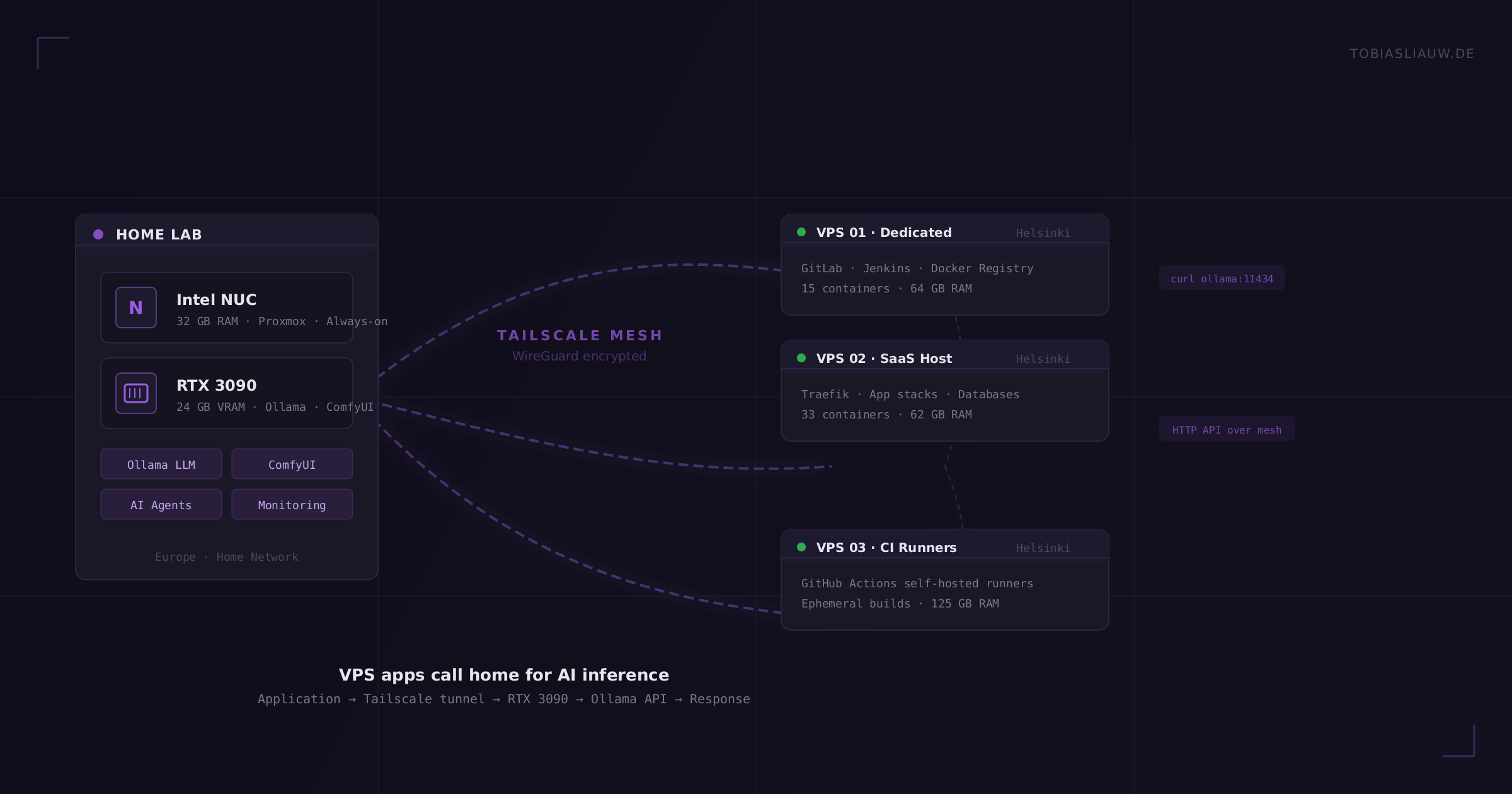
This is the piece that turns isolated services into shared infrastructure. Tailscale is a mesh VPN built on WireGuard. Every machine in my network, from the NUC on a shelf at home to VPS instances in data centers across Europe, joins the same encrypted mesh. Each machine gets a stable IP address that works regardless of where it physically sits.
What this means in practice:
- Any server can call Ollama. A VPS in Helsinki that needs to summarize a document sends the request to the NUC’s Tailscale IP on the Ollama port. The request travels over an encrypted WireGuard tunnel. The VPS doesn’t need its own GPU, its own model files, or any AI dependencies installed. It just makes an HTTP call.
- ComfyUI is accessible from anywhere. I can open the ComfyUI web interface from any machine on the mesh. Design a workflow from my laptop, run it on the NUC’s hardware.
- SSH access is seamless. Tailscale SSH means I can reach the NUC (or any container on it) from anywhere without exposing SSH to the public internet. No port forwarding, no dynamic DNS hassles.
- DNS just works. Tailscale’s MagicDNS means I can reference machines by name.
ollama.tailresolves to the right IP no matter which network I’m on.
The architecture looks like this: the NUC sits behind a home router with no open ports. Tailscale establishes outbound connections to coordinate the mesh. Every other machine, whether it’s a dedicated server in a data center or a container on another Proxmox host, reaches the NUC through the mesh. The traffic is end-to-end encrypted, and the connection is as fast as the underlying internet link.
The Real-World Pattern: VPS Calls Home
Here’s a concrete example of how this runs in production. I operate several web applications on VPS instances across multiple data centers. These applications need AI capabilities: content generation, image processing, classification, embedding generation. The traditional approach would be to either call an external API (OpenAI, Anthropic) and pay per token, or install GPU-enabled instances at significant monthly cost.
Instead, every VPS runs the Tailscale client. When an application needs AI inference, it calls the Ollama API on the NUC’s mesh address. The request flows:
VPS Application → Tailscale Tunnel → Home NUC → Ollama Container → Response
Latency is typically 15-40ms for the network round trip (depending on the data center’s geographic distance), plus inference time. For a 7B model responding to a short prompt, total response time is 2-8 seconds. Not instant, but for background tasks, content pipelines, and batch processing, it’s more than fast enough.
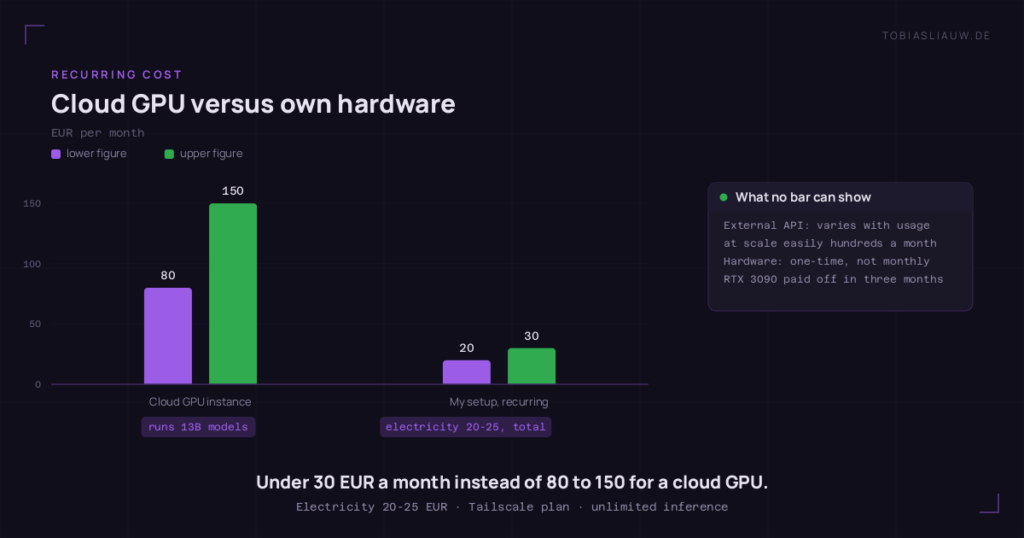
The cost comparison is stark:
- External API approach: Varies wildly with usage. At scale, easily hundreds per month.
- GPU VPS approach: A cloud GPU instance capable of running 13B models starts around 80-150 EUR/month.
- My approach: Hardware was a one-time investment. Ongoing costs are electricity (roughly 20-25 EUR/month for both machines running 24/7) and the Tailscale plan. Total recurring cost under 30 EUR/month for unlimited inference, and the RTX 3090 paid for itself in three months of avoided API costs.
Security Considerations
Running AI inference at home and exposing it to remote servers sounds like a security concern. It is, and it needs to be addressed deliberately:
- Tailscale ACLs restrict which machines can reach which services. Not every machine on the mesh can talk to Ollama. Only the specific VPS instances that need it have access, and only on the specific ports they need.
- The Ollama API has no authentication by default. This is fine because it’s only reachable through the Tailscale mesh, which is authenticated and encrypted. No port is exposed to the public internet.
- The NUC’s Proxmox host runs intrusion detection and monitoring. Any unexpected connection patterns trigger alerts.
- Data stays in transit only within the mesh. Prompts and responses never touch a third-party API. For sensitive business data, this matters.
Scaling Considerations
This setup has limits. A single NUC with CPU inference can handle roughly 5-10 concurrent requests before latency degrades noticeably. For my current workload (a handful of applications making periodic AI calls), this is fine. When it’s not enough, the path forward is straightforward:
- Add another node. A second NUC or a used workstation with a GPU joins the Proxmox cluster and the Tailscale mesh. Load balancing at the application level routes requests to whichever node is least busy.
- Upgrade to GPU inference. Adding a second GPU workstation to the mesh and load balancer is straightforward. The RTX 3090 is already fast; a future RTX 5090 or A6000 would handle 70B+ models.
- Hybrid approach. Use the home hardware for routine tasks and fall back to a cloud API for burst capacity. The application code checks latency and routes accordingly.
What I’d Do Differently
If I were starting from scratch today:
- More RAM. 48 GB VRAM (RTX A6000 or dual-GPU) would unlock 70B+ parameter models locally. The NUC’s 32 GB ceiling is the main constraint.
- Dedicated NAS for models. Keeping model files on each machine wastes disk. A shared NFS mount for the model library would simplify version management across nodes.
- Ollama clustering from day one. Running multiple Ollama instances behind a load balancer, each specialized for different model sizes, would have avoided some early growing pains.
But the core architecture, Proxmox for isolation, Ollama for inference, Tailscale for connectivity, is solid. It’s been running for over a year with minimal maintenance, and every new service I deploy can use AI capabilities with a single HTTP call. No SDK, no API key management, no vendor lock-in. Just infrastructure that works.