My homelab ran for years on a Proxmox node that eventually stopped fitting the job: no room left for a GPU in the chassis, and a steadily growing pile of workloads that wanted one. The replacement was already standing next to it — a workstation I had barely touched in years. This is what became of it, and what moving in actually cost.
Part 1 — A Workstation Becomes a Hypervisor
The hardware is a generation old. That is the point.
The new node is not a bought server, it is a 2020 self-build. The DMI gives it away to this day: Manufacturer: System manufacturer, Product Name: System Product Name. Nobody ever bothered to write an identity into it.
| Mainboard | ASUS ROG Strix X299-E Gaming (Intel X299, LGA 2066), BIOS dated June 2020 |
| CPU | Intel Core i9-10920X, 12 cores / 24 threads, 3.5–4.8 GHz |
| RAM | 128 GB DDR4 (4 × 32 GB, dual rank), effectively 2933 MT/s |
| GPU | 2 × NVIDIA RTX 3090, 48 GB VRAM combined |
| Storage | 5 × NVMe, 1 × SATA SSD, 2 × SATA HDD — roughly 14.5 TB raw |
A CPU with AVX-512 and 24 threads, 128 GB of RAM, 48 GB of VRAM: as a hypervisor that beats most off-the-shelf servers in the same price bracket by a wide margin. The catch turns up somewhere else.
Storage: three pools, three jobs
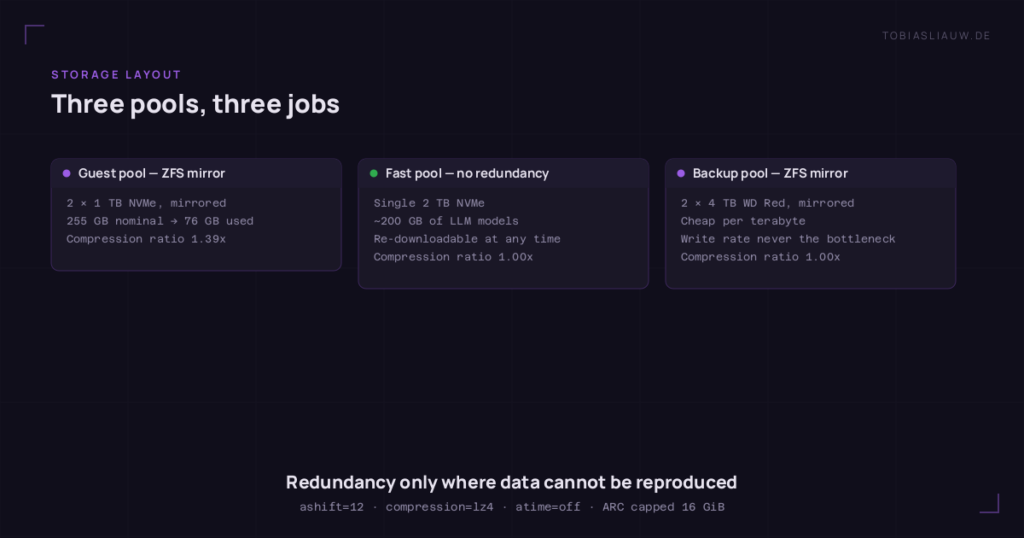
The split follows one simple rule — guests on mirrored NVMe, models on fast single NVMe, backups on mirrored spinning rust.
- Guest pool — a ZFS mirror of two 1 TB NVMe. The appeal of thin ZFS subvolumes shows up immediately: volumes that were nominally provisioned at 255 GB on the old node take up about 76 GB here.
- Fast pool — a single 2 TB NVMe, deliberately without redundancy. Nothing lives there that cannot be reproduced: roughly 200 GB of LLM models, re-downloadable at any time. Anyone who parks something else there had better know it.
- Backup pool — a ZFS mirror of two 4 TB WD Red. Spinning disks are exactly right for backups: cheap per terabyte, and write throughput is never the bottleneck while dumping.
Uniformly ashift=12, compression=lz4, atime=off. The compression ratio on the guest pool sits at 1.39x — on the other two it is 1.00x, because models and zstd dumps arrive compressed already. The ARC is capped at 16 GiB via modprobe.d so it cannot eat RAM the guests need.
Where the platform shows its age
Here is the real compromise:
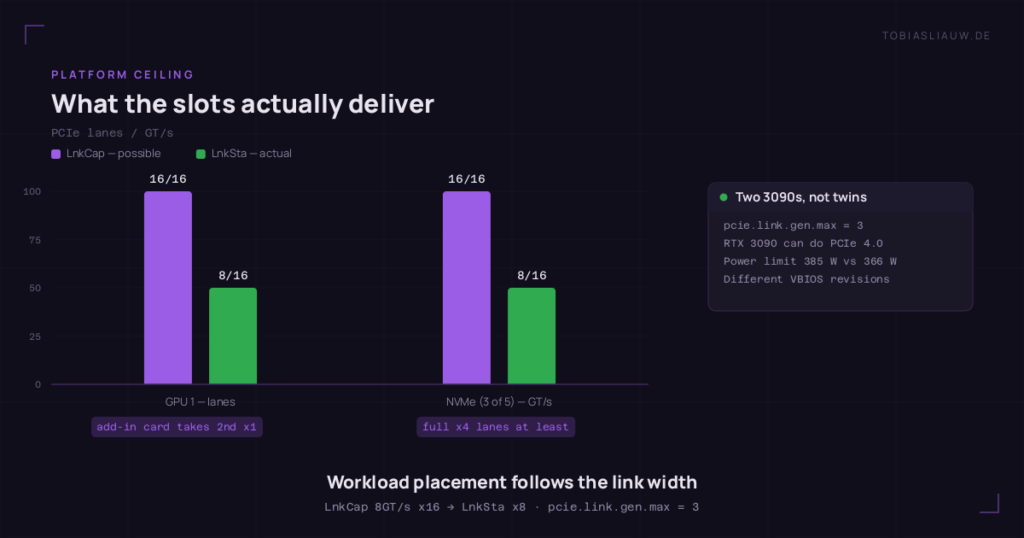
GPU 0   LnkCap 8GT/s x16  →  LnkSta x16     full width
GPU 1   LnkCap 8GT/s x16  →  LnkSta x8      halved
The second card runs electrically at x8, because an add-in card occupies the second x16 slot. Physically not fixable — so the workload placement has to account for it: the compute-heavy container gets the x16 card, the transcoding container gets the x8.
On top of that, nvidia-smi reports pcie.link.gen.max = 3 for both cards. The RTX 3090 can do PCIe 4.0, the X299 platform offers 3.0. Same story on three of the five NVMe: LnkCap 16GT/s meets LnkSta 8GT/s. All of them at least get their full x4 lanes.
And the two 3090s are not even identical twins — different VBIOS revisions, 385 W against 366 W power limit.
GPU passthrough in LXC: three tripwires
1. Device major numbers are host-specific. On the new host they are 195 / 510 / 235 for nvidia, nvidia-uvm and nvidia-caps. On the old one they were 195 / 505 / 508. Copy an lxc.cgroup2.devices.allow line out of an old config and you pass through the wrong devices — on the new host, 508 happens to be lirc. Always read them fresh from /proc/devices.
2. The device nodes have to exist before the guests do. That takes a dedicated unit whose entire value lies in the ordering:
After=systemd-modules-load.service
Before=pve-guests.service pve-container@.service
Type=oneshot
RemainAfterExit=yes
ExecStart=/usr/bin/nvidia-modprobe -c 0 -c 1 -u
3. c 195:* rwm is not a GPU split. I learned that one the hard way. While catching the NVIDIA userspace up, the installer created a missing device node all by itself — and because the cgroup rule allowed every minor number, the container suddenly saw both cards instead of one. The split had never depended on a rule at all, only on the node happening to be absent. The correct way is to name the minor number explicitly.
One more trap, good for half an evening: the NVIDIA userspace inside the container has to match the host driver version. Otherwise you get Failed to initialize NVML: Driver/library version mismatch. The fix is <driver>.run --no-kernel-module --silent inside the container — the kernel module comes from the host, the userspace has to be installed separately.
Networking: one gigabit NIC for 48 GB of VRAM
The only active uplink is the onboard gigabit port. That sounds like a footnote and is in truth the most defining constraint of the entire build — part two shows why.
Three bridges sit on top of it: the LAN management bridge, a VLAN bridge for the IoT network, and an internal bridge with no physical port for isolated worker VMs.
The VLAN bridge carries one line you only learn the painful way:
post-up echo 0 > /sys/class/net/<bridge>/bridge/multicast_snooping
IGMP snooping has to be off there, or home automation loses track of half its devices.
The isolated bridge is the more interesting piece: guests get internet through NAT, but no LAN. Six rules, and the order decides everything — a targeted exception for two monitoring ports sits ahead of the blanket block on the private address range. Every post-up rule has an exact post-down counterpart with 2>/dev/null || true, so an ifdown tears things down cleanly instead of tripping over rules that are already gone.
Part 2 — The Move, and What Went Wrong
Migrating between two standalone hosts
Both nodes stand on their own, there is no cluster. Even so, pct remote-migrate and qm remote-migrate exist: a guest migration between independent hosts over an API token and a WebSocket tunnel. No shared storage required, no cluster membership. Elegant on paper.
In practice there are seven pitfalls. Six of them are unpleasant but visible. The seventh is the reason I am writing this.
The six visible ones
1. LVM-thin to ZFS does not work directly. lvmthin exports the format raw+size, zfspool speaks nothing but zfs. There is no conversion anywhere in the migration path. So migrate to a format-compatible storage first, then move the volume locally with move-volume.
2. Bind mounts block the migration — cannot migrate local bind mount point. They have to come out of the config beforehand and go back in on both sides afterwards.
3. The container has to be stopped for that. A set --delete mpN on a running container only lands in the pending section; the mounts stay active and the migration aborts anyway.
4. Feature flags other than nesting fail on the token. An API token is not allowed to set them, the API answers with 403. Strip them before the transfer, write them back on both sides afterwards — and remember that Docker inside the container needs keyctl.
5. Raw lxc.* lines are not carried over. No lxc.cgroup2.devices.allow, no lxc.mount.entry. For containers with /dev/net/tun or GPU passthrough that means adding them back by hand. Oddly enough, vzdump does carry them.
6. What travels is the provisioned size, not the used size. A container provisioned at 430 GB with 60 GB in use pushes 430 GB down the wire. On a gigabit uplink that is the difference between one hour and eight. For cases like that the detour through vzdump is the better route: file-based, and the restore lets you pick a new rootfs size.
The seventh: rc=0 and broken anyway
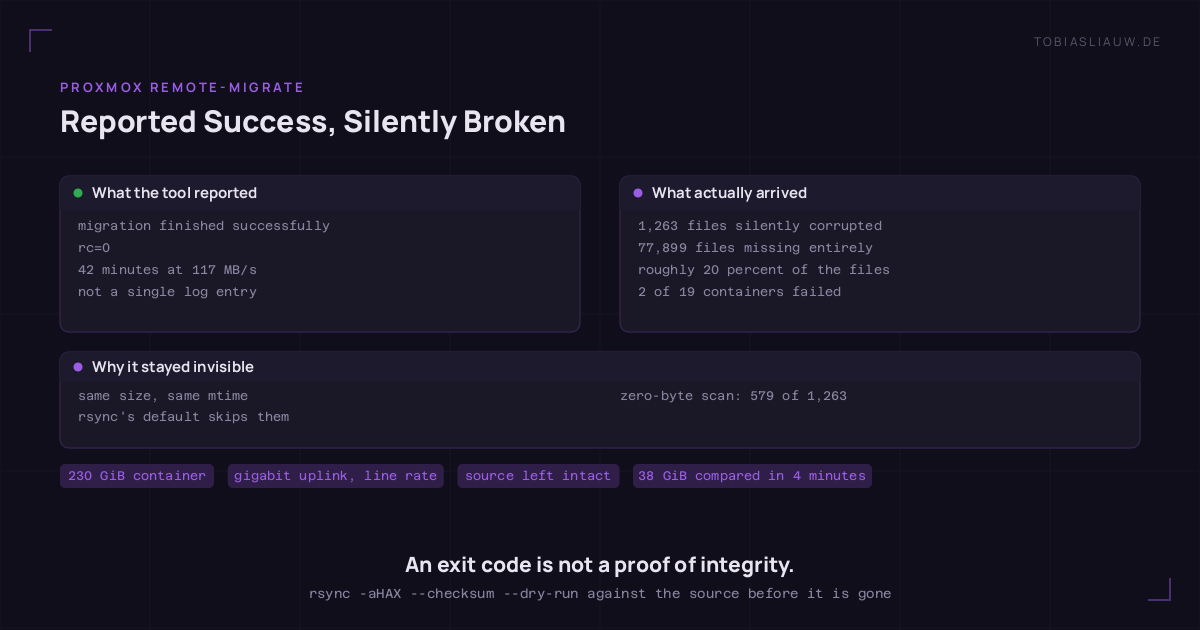
The last container was the biggest: an offline knowledge server at 230 GiB, 200 GiB of it vector database. The transfer ran for 42 minutes at a steady 117 MB/s — line rate for gigabit. At the end:
migration finished successfully
rc=0
On the first start at the destination, two of nineteen Docker containers failed:
redis:   Wrong signature trying to load DB from file
homebox: failed to mount ... fstype: overlay ... err: bad message
bad message is EBADMSG, and on ext4 that is the code for a metadata checksum error — not an overlayfs problem, which is what you suspect first. The kernel had logged it long before:
EXT4-fs error: __ext4_find_entry: checksumming directory block 0
EXT4-fs warning: No space for directory leaf checksum. Please run e2fsck -D.
tune2fs -l confirmed it: Filesystem state: clean with errors, first error timed exactly to the start.
The blast radius was far larger than those two containers
After e2fsck -fyD came a full comparison against the still-untouched source:
| rsync itemization | Count | Meaning |
|---|---|---|
<fc........ |
1,152 | same size, same mtime, different content |
| other variants | 111 | content differed as well |
<f+++++++++ |
77,899 | missing at the destination entirely |
1,263 files were silently corrupted, and roughly 20 percent of the files were missing outright. At rc=0. Without a single log entry.
Why this stays invisible for so long
The source container had been running for days — every affected file was sitting in the page cache. Only the cold start at the destination reads them off the disk. The same mechanic explains why nothing ever looked wrong on the source. “It runs, doesn’t it” is therefore no proof of integrity.
The repair — and the one switch that mattered
e2fsck -fyD /dev/<vg>/<volume>
mount -o ro,noload /dev/<vg>/<volume> /mnt/source
rsync -aHAX --numeric-ids --checksum --delete --itemize-changes /mnt/source/ target:/mnt/target/
--checksum is the entire point. The corrupted files have the same size and the same mtime as the original — rsync’s default heuristic skips every last one of them. Without that switch the run reports “nothing to do” and rubber-stamps the damage. Comparing 38 GiB took four minutes.
The rule that follows from it
After every
remote-migrate, run anrsync --checksum --dry-runagainst the source before the source is touched or deleted.rc=0proves nothing.
And heuristics make decent pre-filters, never a sign-off. A search for files whose first 4 KiB were entirely zeroed found only 579 of the 1,263 damaged files — less than half. It found zero hits in /usr/bin, /usr/lib and /usr/sbin; the damage sat in the container layers and in the application directory. Scan system directories only and you are guaranteed to see nothing.
Two lessons that have nothing to do with the migration tool
Shared backup stores do not prune per node. Both hosts wrote into the same flat export. The prune function takes storage, retention, VMID and type — no node dimension, and the filenames carry no node marker. So the jobs on either node clear out the other one’s archives. In my case that threatened to run both ways at once: the new weekly job would have deleted the deliberately retained monthly archives of the old node, and the old node’s daily jobs would have pushed the fresh copies out within three days.
Configuration does not only live in configuration files. An orchestrator kept handing work to the old host despite a corrected .env — around 400 API requests an hour. The cause sat in a SQLite database: one table had been correct for a while, but fifteen rows in another still carried the old node name. A grep -r over /etc never finds something like that.
What saved the move in the end
Two decisions, both made beforehand:
The source stayed up. remote-migrate only deletes it on an explicit --delete. Without an intact source the repair would simply have been impossible — there would have been nothing left to compare against.
Everything ran detached. An earlier attempt had died on interrupted by signal, in all likelihood a SIGHUP from an SSH session dropping out. Since then every long-running operation runs under systemd-run --unit=…. Since then none of them has aborted.
The real return on this move is not the faster host. It is knowing that an rc=0 proves nothing — and the habit of checking that while the source is still there.