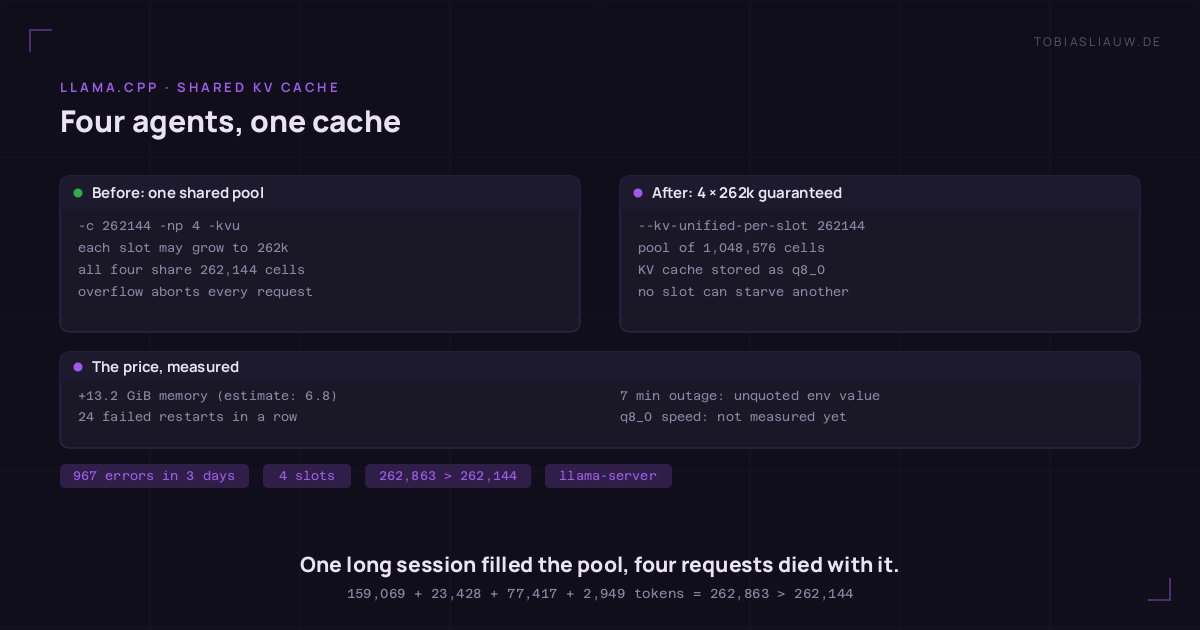
My coding agent kept dying with Error: Context size has been exceeded. Its status line said 16.7 % of 262k, so about 44,000 tokens. Auto-compaction was switched on. By every measure the agent could see, there was plenty of room left.
The agent was not wrong about its own session. The server just had a different idea of what “262k” meant. This post walks through the setup, how I found the cause in the server log, the fix, and the two mistakes I made while applying it.
The setup
One NVIDIA GB10 machine with 128 GB of unified memory runs llama-server from llama.cpp with Qwen3.8-Flash-Next (IQ3_S). The model natively supports a context of 262,144 tokens. Several clients use it at the same time: coding-agent sessions on other machines and an agent orchestration tool.
The server was started with these context flags:
llama-server … -c 262144 -np 4 -kvu-np 4 gives four parallel slots, so four requests can run at once. -kvu (unified KV cache) puts all four slots into one shared KV buffer. Without -kvu, llama.cpp splits -c evenly: four slots of 65,536 each. With it, every slot may use up to the full 262,144, but the sum of all slots has to fit into the same 262,144 cells.
That is exactly what the startup line says, if you read it as a sentence:
load_model: initializing, n_slots = 4, n_ctx_slot = 262144, kv_unified = 'true'Four slots, each promised 262,144, and one pool of 262,144 behind all of them. That is a promise the server can keep only as long as nobody uses it.
What the log showed
Over three days the server log contained the error 967 times. One failure, with the four release lines that came right after it, tells the whole story (shortened: timestamps and task IDs removed):
decode: failed to find free space in the KV cache, retrying with smaller batch size, off = 1329, n_batch = 1024
decode: failed to find a memory slot for batch of size 719
… (halving down to n_batch = 1)
slot release: id 0 | stop processing: n_tokens = 159069
slot release: id 1 | stop processing: n_tokens = 23428
slot release: id 2 | stop processing: n_tokens = 77417
slot release: id 3 | stop processing: n_tokens = 2949
update_slots: decode() failed: Context size has been exceeded.| Slot | Tokens at the failure | Share of the pool |
|---|---|---|
| 0 | 159,069 | 60.7 % |
| 1 | 23,428 | 8.9 % |
| 2 | 77,417 | 29.5 % |
| 3 | 2,949 | 1.1 % |
| Sum | 262,863 | 100.3 % |
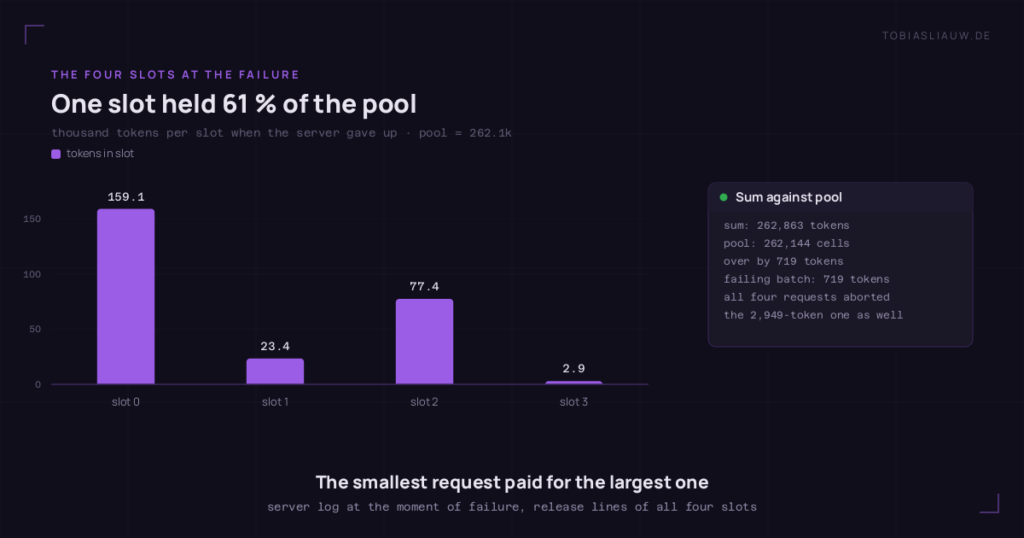
The sum is 262,863. The pool holds 262,144. The difference is 719 tokens, which is exactly the size of the batch that could not be placed. The server tried smaller and smaller batches, gave up, and then ended all four requests. The request in slot 3 held fewer than 3,000 tokens and died anyway.
Why auto-compaction could not help
The coding agent compacts its history when its own session approaches the context window it was given (262,144). It cannot see the other clients. From its point of view, 44,000 of 262,144 is a calm 16.7 %. The pool was filled by someone else, and the agent was collateral damage.
This is the main lesson of the whole exercise: with a shared KV pool, the context window a client is told is not a guarantee. It is an upper bound that holds only while the other slots are small.
The options
| Option | Flags | Per-slot window | Cost |
|---|---|---|---|
| A | --kv-unified-per-slot 131072 | 131,072, guaranteed | pool doubles; clients must be told 128k |
| B | --kv-unified-per-slot 262144 -ctk q8_0 -ctv q8_0 | 262,144, guaranteed | pool ×4, stored at 8 bit |
| C | --kv-unified-per-slot 262144 (f16) | 262,144, guaranteed | pool ×4 at 16 bit, roughly twice the memory of B |
no -kvu | -c 262144 -np 4 | 65,536 each | nothing; long sessions fail early and cleanly |
--kv-unified-per-slot N keeps the unified buffer but caps every slot at N and, if you do not give -c, sizes the pool to slots × N. With that, the sum can never exceed the pool. A single session that grows past N still fails, but it fails alone.
I chose B: every client keeps its full 262k, and the 8-bit cache needs about half the memory of C. On unified memory that matters more than it looks. The model reads parts of its weights lazily from files through the page cache, and every gigabyte of KV cache comes out of that same memory. Option C would have pushed model data out of the cache and slowed decoding down.
The fix
llama-server … -c 1048576 -np 4 -kvu --kv-unified-per-slot 262144 -ctk q8_0 -ctv q8_0(The launcher always passes -c, so I set it to the pool size, 4 × 262,144.) The new startup line:
llama_context: n_ctx_seq (1048576) > n_ctx_train (262144) -- possible training context overflow
load_model: initializing, n_slots = 4, n_ctx_slot = 262144, kv_unified = 'true'
The warning refers to the size of the shared pool. The per-slot limit stays at the model’s native 262,144, which is what keeps it harmless. After the restart, a real chat request (not just the health endpoint) came back with an answer.
Two mistakes, measured
The memory estimate was off by a factor of two. From the model card’s figure of about 24 KB of KV cache per token I estimated roughly 6.8 GiB more for the larger q8_0 pool. Measured: the server process went from 62,232 to 75,720 MiB, so 13.2 GiB more. It still fits, but if I had chosen option C on the strength of that estimate, it would have been tight. Measure before and after; do not size a production box from a per-token figure.
An unquoted value cost seven minutes of downtime. The launcher reads its settings from an environment file that is sourced by bash. I wrote:
EXTRA_ARGS=--kv-unified-per-slot 262144 -ctk q8_0 -ctv q8_0Bash reads that as “set EXTRA_ARGS for the following command” and then tries to run a command called 262144. The service exited with status 127, systemd restarted it 24 times, and every client was without a model for about seven minutes until I read the journal. The correct line has quotes:
EXTRA_ARGS="--kv-unified-per-slot 262144 -ctk q8_0 -ctv q8_0"Troubleshooting checklist
- Count the error.
journalctl -u <your llama-server unit> | grep -c "Context size has been exceeded". A handful means one oversized session; hundreds means a shared pool. - Read the startup line. Search for
n_slots. If it sayskv_unified = 'true'andn_ctx_slotequals your-c, the slots share one pool. - Look for the cascade.
failed to find free space in the KV cache, retrying with smaller batch sizehalving down to 1 is the pool running out, not a single long prompt. - Add up the release lines. The
slot release … n_tokenslines right after the error give each slot’s size. If their sum is just above the pool, you have your answer. - Check who is connected. One heavy client (an orchestrator replaying long histories, an agent with a big repository in context) is usually enough to fill the pool for everyone.
Dos and don’ts
Do
- Size the pool as slots × the window you promise each client, with
--kv-unified-per-slot. - Tell clients the per-slot window, so their compaction triggers against a limit that is actually guaranteed.
- Read the startup line after every change, not just the health endpoint.
- Measure process memory before and after; per-token estimates can be off by a factor of two.
- Quote every value with spaces in a sourced environment file, and check it before restarting:
bash -n file.env && (source ./file.env; echo "[$EXTRA_ARGS]"). - Verify with a real completion request, and keep a copy of the old config for an immediate rollback.
Don’t
- Don’t read
-cas “per slot” when-kvuis on. It is the total. - Don’t rely on client-side auto-compaction to protect a shared pool; the client cannot see the other slots.
- Don’t treat
-npas free concurrency. Every slot’s worst case has to fit at the same time. - Don’t spend unified memory on a 16-bit cache if the model streams its own weights through the page cache; 8-bit costs half and usually no measurable quality.
- Don’t restart a shared inference server without a probe and a rollback ready.
What is still open
Two things I have not measured yet. First, whether the error count really stays at zero: the fix is a few hours old, and only a few days of logs will tell. Second, whether the q8_0 cache changes decoding speed on this model. I will add both here once I have the numbers.